


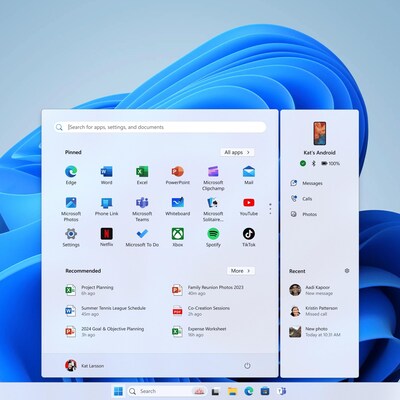

Users of Android smartphones will be able to connect and use their devices immediately from the Start menu on their Windows 11 PCs thanks to a new feature that Microsoft is rolling out. With this feature, users will be able to access phone messages, calls, and images in addition to viewing their phone’s battery life and connectivity status from the Start menu.
The capability is being gradually rolled out to the select individuals who have enlisted in the Windows Insider club, according to a recent update from Microsoft on the Windows Insider Blog. Although the feature is presently limited to Android handsets, the company has said that iOS compatibility will be added eventually.
Phone Link via the Start menu: How to configure
Windows 11 must be installed on the PC in order to use this feature, and Android version 8 or higher must be installed on smartphones. It should be mentioned that the PC and smartphone must be linked to the same wireless network.
Type Phone Link into the taskbar search box, then choose it from the list of results.
If you are not logged in to Windows already, sign in with your Microsoft account.
Using the same Microsoft account, download and install the “Link to Windows” app from the Google Play Store onto your smartphone.
Choose “Pair with QR code” after checking the “I have the Link to Windows app ready” box on your computer.
Choose the “Link your phone and PC” option from the Phone Link app on your smartphone, then proceed.
Scan the QR code on your PC using the in-app camera. Select “done” after following the app’s instructions.
Examine the recently added Phone Link area, which appears as a floating bar next to your PC’s Start menu.
To oversee this new division navigate to Personalisation > Settings > Start